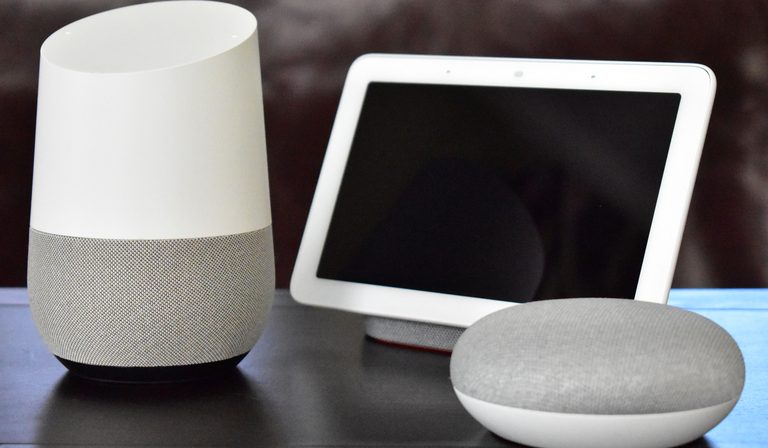
By 2026, the smart home landscape has shifted. Matter and Thread promised to kill the dedicated hub, and voice assistants now double as controllers. Yet many setups still rely on a separate box. The question isn’t whether hubs exist—it’s whether you actually need one. This comparison breaks down the options by cost, reliability, and ecosystem lock-in so you can decide what fits your home.
The Case for No Hub: Voice Assistants as Your Controller
If you already own an Amazon Echo, Google Nest Hub, or Apple HomePod, you already have a hub—sort of. These devices can control Wi-Fi–based smart lights, plugs, and switches directly. With Matter support, they can also manage Thread devices (via a built-in border router) and some Zigbee devices (Echo 4th gen and newer, for example).
Pros
- Zero extra cost if you already have a smart speaker.
- Simple setup: scan a QR code, add device, done.
- Voice control and routines work out of the box.
Cons
- Cloud dependency: most commands go through Amazon, Google, or Apple servers. If your internet goes down, local control often breaks (Apple Home is slightly better with local processing on Apple TV/HomePod).
- Limited protocol support: you’re stuck with Wi-Fi, Matter, and whatever Zigbee the speaker happens to support. Z-Wave is out.
- Ecosystem lock-in: Alexa won’t easily talk to Google devices, and advanced automations (e.g., “if motion sensor triggers after sunset, turn on lights for 10 minutes”) may require cloud subscriptions or third-party apps.
Who it’s for: Renters, minimalists, or anyone with fewer than ten devices who doesn’t mind occasional cloud outages.
Dedicated Smart Home Hubs: Local Control and Broad Protocol Support
Dedicated hubs like Hubitat Elevation, Home Assistant Yellow, or Samsung SmartThings Station (now with Matter) are built for one job: managing your devices locally. They support Zigbee, Z-Wave, Thread, and Wi-Fi, often in one box.
Pros
- Local processing: automations run even when the internet is down. Response times are milliseconds, not seconds.
- Broad protocol support: you can mix a Z-Wave deadbolt, a Zigbee motion sensor, and a Thread light without worrying about compatibility.
- Advanced automations: rule engines, conditional logic, and custom scripting (especially on Home Assistant).
- No cloud subscription required (though some hubs offer optional cloud access for remote control).
Cons
- Cost: $100–$400 for the hub, plus possible accessories (USB dongles, SD cards).
- Setup complexity: you’ll need to pair devices manually, configure networks, and possibly write simple scripts.
- Maintenance: firmware updates, occasional reboots, and troubleshooting when a device drops off.
Who it’s for: Tech enthusiasts, privacy-conscious users, or anyone with more than 15 devices who wants reliable, fast automations.
The Hybrid Approach: Voice Assistant + Dedicated Hub
Many people run a voice assistant as the primary interface and a dedicated hub as the back-end brain. For example, an Apple TV (with Thread) handles voice and remote access, while a Hubitat manages Z-Wave locks and Zigbee sensors. The two are bridged via HomeKit or Matter.
Pros
- Best of both worlds: voice control and local reliability.
- Flexibility: you can start with a voice assistant and add a dedicated hub later without ripping out existing gear.
- Redundancy: if one system fails, the other still works for its own devices.
Cons
- Higher cost: $50–$150 for the voice assistant hub + $100–$300 for the dedicated hub.
- Double the setup: you have to configure two systems and keep them in sync.
- Potential latency: bridging between hubs can add a slight delay (usually <1 second, but noticeable in some automations).
Who it’s for: Users who want local reliability but also want family-friendly voice control. Common setup: Amazon Echo + Hubitat or Apple HomePod + Home Assistant.
The Role of Matter and Thread: Hub Reducer, Not Hub Killer
Matter and Thread were supposed to make hubs obsolete. In practice, they’ve reduced the need for a dedicated hub but haven’t eliminated it.
- Matter controllers (e.g., Apple TV, Google Nest Hub, Amazon Echo) can manage Matter devices directly. No separate hub needed for those devices.
- Thread border routers (built into many smart speakers) handle Thread devices.
- But: Matter doesn’t support Z-Wave at all. Legacy Zigbee devices (pre-Matter) often require a bridge or hub. And many existing smart home devices (especially sensors and locks) still use Z-Wave because of its range and low power.
So if you buy only Matter/Thread devices, you can skip a dedicated hub. But if you already own Z-Wave or older Zigbee gear, or if you want the widest device selection, you still need a hub.
Tradeoff: Matter is still maturing. Some devices have firmware bugs, and multi-admin (controlling a device from both Alexa and Google) can be flaky. A dedicated hub often provides a more stable experience for mixed-protocol homes.
Cost and Reliability Comparison
| Option | Upfront Cost | Monthly Cost | Internet Required? | Local Control? | Device Limit |
|---|---|---|---|---|---|
| No hub (voice assistant only) | $0–$50 | None (but cloud services may push subscriptions) | Yes for most commands | Limited | ~10–15 Wi-Fi devices |
| Voice assistant as hub (Echo, Nest, Apple TV) | $50–$150 | None | Yes for voice, some local for Apple | Partial (Apple Home local, others cloud) | ~20–30 devices |
| Dedicated hub (Hubitat, Home Assistant, SmartThings) | $100–$400 | None (optional cloud access $5–$10/mo) | No for automations | Full | 50–200+ devices |
| Hybrid (voice + dedicated) | $150–$500 | None (optional cloud) | No for automations | Full | 50–200+ devices |
Reliability note: Dedicated hubs rarely go down. Voice assistant hubs can become unresponsive during cloud outages or firmware updates. If you rely on smart locks or security sensors, local control is a real advantage.
Who Should Buy What in 2026
- Renters or apartment dwellers with fewer than 10 devices: skip the dedicated hub. Use a smart speaker with Matter. You’ll save money and avoid installation hassles.
- Homeowners with 10–20 devices (lights, plugs, a thermostat): a voice assistant hub (especially Apple Home or Amazon Echo with Zigbee) is sufficient. Add a Thread border router if needed.
- Tech enthusiasts or privacy advocates: go dedicated. Home Assistant Yellow or a used Intel NUC running Home Assistant gives you full local control, no cloud, and endless customization.
- Mixed-protocol users (Z-Wave locks, Zigbee sensors, Thread lights): hybrid is the only sane option. Use a voice assistant for daily control and a dedicated hub for the back-end.
- Security-conscious users: dedicated hub with no internet access for automations. Add a separate cloud bridge only for remote access if needed.
Closing Recommendation
For most people in 2026, a voice assistant hub (Echo, Nest, or Apple TV) handles the basics well enough—especially if you stick to Matter and Thread devices. But if you value reliability, local control, or have a mixed-protocol setup, a dedicated hub like Hubitat or Home Assistant is worth the extra cost and setup time. Start with what you have, and only add a dedicated hub when your voice assistant’s limitations start to annoy you.
This page contains affiliate links. If you purchase through these links, we may earn a small commission at no extra cost to you.