By 2026, the smart lock market has matured. Matter is the standard, Thread and Wi-Fi are common, and most major brands have ironed out the early reliability issues. But that doesn’t mean every lock is worth your money. Some still lock you into a single ecosystem, drain batteries in weeks, or charge a subscription for basic remote access. This guide cuts through the noise and tells you exactly which categories to buy and which to leave on the shelf.
The Matter-Ready Full Deadbolt (Best Overall)
Price range: $200–$300
Best for: Homeowners who want universal compatibility and reliable remote access
If you own your home and want a lock that works with Apple Home, Google Home, Amazon Alexa, and SmartThings without extra hubs, this is your category. These locks replace your entire deadbolt assembly and connect via Wi-Fi plus Thread (for Matter). They support auto-lock, voice control, and guest codes. Battery life is typically 6–12 months with normal use.
Tradeoffs:
- Price: $200–300 is not cheap, but you get full features and no subscription.
- Installation: You need to replace the entire deadbolt, which can be tricky on non-standard doors.
- Ecosystem lock-in: None, thanks to Matter. But some brands still require their own app for advanced features like temporary codes. Look for locks that expose all functions through Matter.
Reliability: High. Brands like Schlage, Yale, and Level have been iterating for years. Avoid early-adopter brands that rushed Matter support—stick with established names.
Verdict: Buy this if you want a single lock that works everywhere and doesn’t force you into a hub.
The Retrofit Smart Lock (Best for Renters)
Price range: $150–$200
Best for: Apartments, dorms, or anyone who can’t change the deadbolt
Retrofit locks replace only the interior thumb-turn while leaving the exterior key cylinder and deadbolt intact. You keep your existing key for backup. They connect via Bluetooth or Wi-Fi and often include a keypad. Popular examples include the August Wi-Fi Smart Lock and the Wyze Lock Bolt (though specific models change yearly).
Tradeoffs:
- Security: The exterior lock is still a standard key cylinder, which can be picked. The smart part only controls the interior. This is fine for most rental situations, but not ideal for high-security needs.
- Bulk: The interior unit is larger than a full deadbolt replacement. It can interfere with door clearance or look ugly.
- Battery life: Typically shorter than full deadbolts because the motor has to turn the existing mechanism. Expect 3–6 months.
- Ecosystem: Many retrofit locks are Bluetooth-only unless you buy a separate Wi-Fi bridge. That bridge adds cost and another point of failure.
Reliability: Good for the price, but the extra mechanical linkage between the smart motor and the deadbolt can jam if the door is misaligned.
Verdict: Buy this if you rent and can’t change the lock. Skip it if you own—a full deadbolt is more secure and reliable.
The Budget Keypad Lock (Under $100)
Price range: $60–$100
Best for: Single users who only need keyless entry, no remote access
These locks are simple: a keypad on the outside, a manual thumb-turn inside, and no Wi-Fi or Bluetooth. You program a few codes directly on the lock. No app, no notifications, no voice control. They run on AA batteries that last a year or more.
Tradeoffs:
- No remote access: You can’t check if the door is locked or unlock it from your phone. If that’s fine, this is a great value.
- Limited codes: Most hold 4–10 codes. Not suitable for frequent guests or Airbnb.
- No auto-lock: You must manually lock or set a timer. Some models have a basic auto-lock timer, but it’s not adjustable via app.
- Security: Basic keypads can be vulnerable to brute-force or smudge attacks. Look for models with a lockout after wrong attempts.
Reliability: Very high—fewer electronics means fewer failure points. Brands like Schlage and Kwikset have been making these for decades.
Verdict: Buy this if you just want to stop carrying keys and don’t care about smart features. Skip it if you ever need to let someone in remotely.
The Fingerprint Lock (Convenience with Caveats)
Price range: $150–$250
Best for: Users who hate codes and keys, and live in mild climates
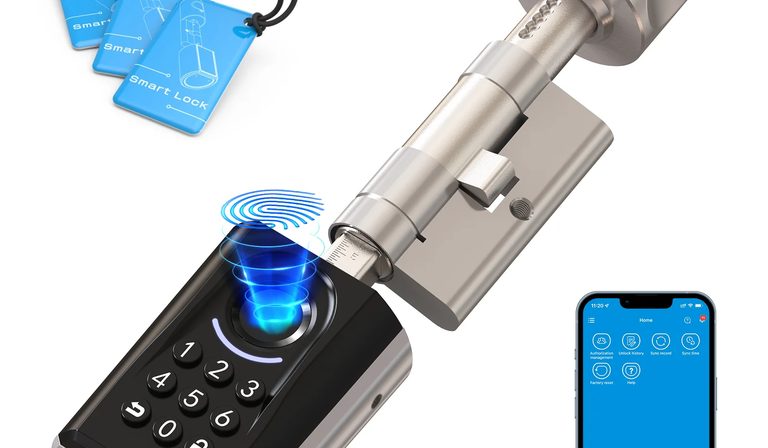
Fingerprint smart locks use a capacitive or optical sensor to unlock. They often include a keypad and key override. Many are Matter-compatible and offer Wi-Fi. The appeal is one-touch entry—no code to remember, no phone to pull out.
Tradeoffs:
- Reliability in weather: Capacitive sensors struggle with wet, cold, or dirty fingers. Optical sensors are better but still fail more often than a keypad.
- Battery drain: The sensor and processing consume more power. Expect 3–6 months.
- Privacy: Your fingerprint is stored on the lock (or in the cloud, depending on the brand). Some users are uncomfortable with biometric data on a device that sits outside.
- Guest management: You can’t easily share a fingerprint. You’ll need to add codes for guests anyway.
Reliability: Mixed. High-end models (e.g., from Yale or Samsung) are decent, but budget fingerprint locks are notorious for false rejects.
Verdict: Buy this if you live in a mild climate and really want fingerprint convenience. Skip it if you need reliable entry in rain or snow, or if you share the lock with many people.
Which to Skip
Not every smart lock is worth your money. Here are the categories to avoid in 2026:
1. Locks that require a proprietary hub.
If a lock needs a brand-specific hub (not a standard Thread border router or Zigbee coordinator), skip it. That hub is a single point of failure and often costs $50–$100 extra. Matter and Thread have made these obsolete.
2. Locks with mandatory subscriptions.
Some brands charge $5–$10/month for remote access, activity logs, or unlimited codes. That’s a scam. Every lock in the “worth buying” categories above gives you remote access for free (via Matter or the manufacturer’s app). If a lock requires a subscription for basic features, walk away.
3. Locks with poor battery life (under 3 months).
Any lock that needs battery changes more than twice a year is a hassle. Look for at least 6 months of real-world use. Avoid locks with Wi-Fi-only radios that drain batteries fast—prefer Thread or Z-Wave for lower power.
4. Locks with unreliable geofencing.
Auto-unlock based on your phone’s location sounds great, but it’s still flaky in 2026. It often unlocks when you’re still in the driveway, or fails to unlock when you’re at the door. If you want auto-unlock, use a dedicated presence sensor (like a door sensor + NFC tag) rather than relying on the lock’s geofencing.
5. No-name brands on Amazon.
Stick with established brands that have been in the lock business for years. A $40 smart lock from a random Chinese seller might work for a month, then fail. You don’t want to be locked out.
Closing Recommendation
For most people, a Matter-compatible full deadbolt from a major brand (Schlage, Yale, Level) is the safest bet in 2026—it works with any smart home system, has reliable battery life, and requires no subscription. Renters should go with a retrofit lock from August or Wyze, but accept the tradeoffs in security and bulk. Avoid fingerprint locks unless you’re willing to deal with weather-related failures, and skip any lock that demands a proprietary hub or monthly fee. Smart locks are finally mature enough to buy without second-guessing—just pick the right category for your situation.
This page contains affiliate links. If you buy through these links, we may earn a small commission at no extra cost to you.